Parts and costs
As an Amazon Associate I earn from qualifying purchases.
These four parts cost me €81.11 in total when I bought them.
-
Refurbished Amazon Fire HD 8 (2022), 32 GB
€51.49
Alternative on Amazon.de: refurbished Fire HD 8 (2024), 32 GB (paid link) -
sciuU universal wall mount
-
UGREEN right-angle USB-C cable (90°, 1 m, 60 W)
-
ZINOOY slim USB-C/USB-A power adapter (35 W)
Position the mount and cable
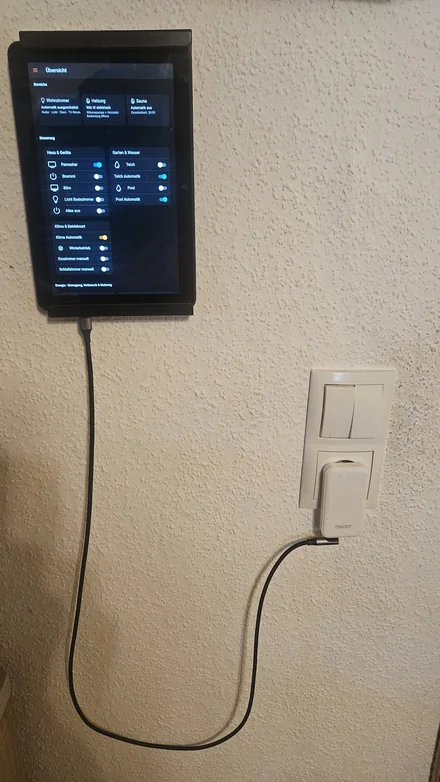
I mounted the tablet in portrait orientation between two rails. The cable comes out at the bottom and forms a loose loop before it reaches the power adapter. The right-angle plug points sideways at the adapter. Before fixing the rails, hold the tablet in position with the cable connected. Check that the tablet port stays accessible and that you have room to remove the tablet.
Set up Fully Kiosk Browser
Fully Kiosk Browser worked well on my Fire HD 8. Here’s how to make the openHAB overview the start page on your wall tablet.
- Test the dashboard URL. Connect the tablet to a Wi-Fi network that can reach your openHAB controller. Open the page you want in Amazon Silk and copy its full address. Use the Overview page or create your own page on your computer under Settings → Pages.
- Install the app. On the tablet, open the official download page, select Get APK for Fully Kiosk Browser, and open the downloaded file. If Fire OS prompts you, allow Silk to install apps from this source. You can turn that permission off after installation.
- Set the start page. Open Fully Kiosk Browser and swipe right from the left edge to open its menu. Go to Settings → Web Content Settings → Start URL and paste the address you tested, including
http://orhttps://and any port or page path. Return to the browser and check that the dashboard loads. - Hide the browser bars. Under Toolbars and Appearance, you can turn off Show Address Bar and Show Action Bar. Check that you can comfortably reach the controls in portrait orientation.
- Try starting on boot. To open the dashboard when the tablet restarts, enable Launch on Boot under Device Management. Restart the tablet to test it, as behavior can vary by Fire OS version.
If you want to restrict how users leave the app, you can try Kiosk Mode with a PLUS license. Set a PIN and test unlocking it before mounting the tablet.
Test it before mounting
Reload the page on the intended Wi-Fi network. Check one reading and a switch you can safely operate. Unplug and reconnect the charger to see whether you can reach its connector with the tablet in the mount.